Best Ergonomic Chair Setup for Home Office: If you spend most of your day working at home, your chair setup can make or break your comfort. Many people invest in laptops, good lighting, or faster internet, but forget that the chair is where their body spends eight or more hours every day. A poor setup can slowly lead to back pain, stiff shoulders, headaches, or overall fatigue — all of which take a toll on your productivity.
The good news? You don’t need a high-end studio or an ultra-expensive chair to create a comfortable workspace. With the right adjustments (and a bit of awareness), you can build a fully ergonomic chair setup that supports your posture and keeps you pain-free.
Let’s walk through what the ideal setup looks like — step-by-step.
Why Ergonomics Matter in Your Home Office
Ergonomics is all about designing your workspace around your body-not the other way around. A well-optimized ergonomic setup helps you:
- Maintain a healthy spinal alignment
- Reduce common work-from-home injuries
- Boost productivity and energy
- Prevent long-term musculoskeletal problems
- Improve comfort and concentration
It is not just the chair that is ergonomic; it is the proper adjustment that provides full benefits.
The Best Ergonomic Chair Setup for Home Office
Here’s a detailed guide on creating the best ergonomic chair setup for home office:
1. Choose the Right Ergonomic Chair
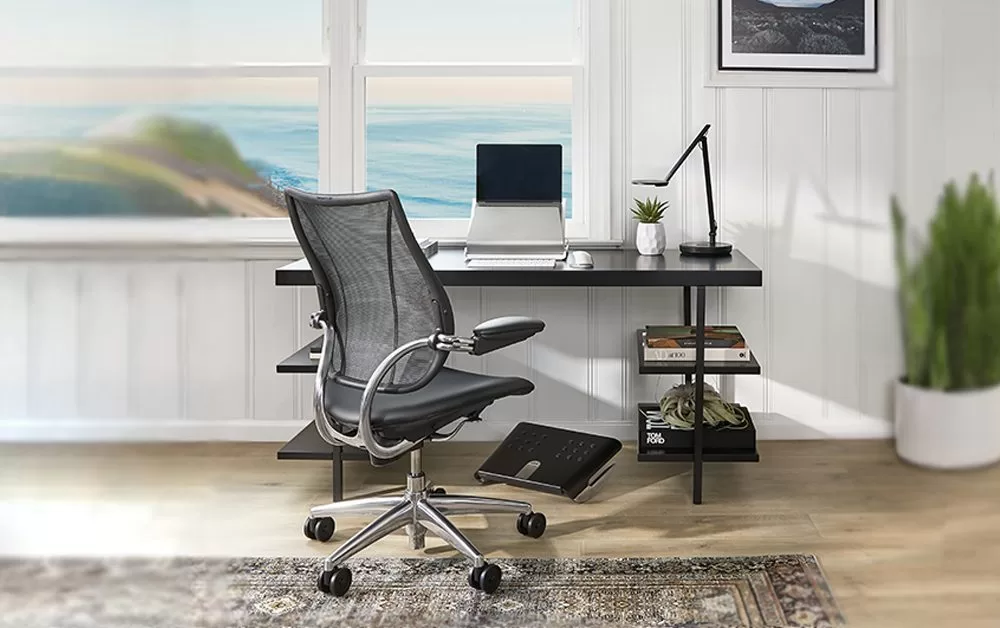
Before fine-tuning your setup, start with the right chair. Here’s what to look for:
- Adjustable Seat Height: Your feet should be flat on the floor, with your knees at 90° angles. Look for chairs with gas lift adjustments that enable fine-tuning of the height.
- Lumbar support: Quality lumbar support prevents strain on the lower back. Adjustable lumbar depth or height gives you better customization for your natural spine curve.
- Adjustable Armrests: Armrests should support your forearms without lifting your shoulders. Armrests that are height- and width-adjustable are best.
- Breathable backrest: It features a breathable mesh backrest for even distribution of back pressure-a must for long work sessions.
- Seat Depth Adjustment: This feature helps you keep 2–3 fingers of space between the back of your knees and the seat’s edge.
- Recline and Tilt Lock: A reclining backrest helps relieve spinal compression and improve comfort during breaks.
2. Proper Chair Height and Sitting Posture
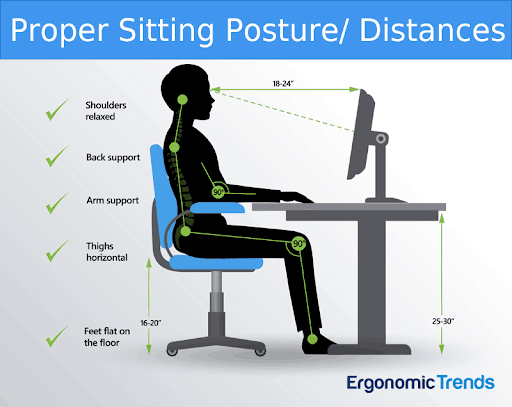
Even the very best chair will not help you if you sit incorrectly. Here’s the ideal ergonomic posture:
- Ideal Sitting Position
- Feet flat on the floor
- Knees at 90°
- Hips slightly above the knee level
- Back fully supported by backrest
- Shoulders relaxed, not raised
- Elbows at 90°–110°
- Wrists straight while typing
3. Position Your Desk and Monitor Correctly
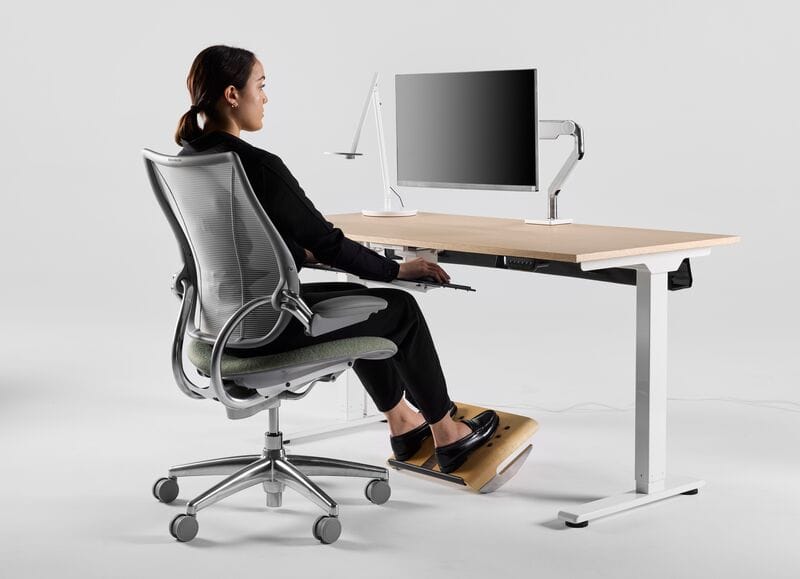
Your ergonomic chair setup works best paired with a proper desk layout.
- Height of the Monitor: The top of the screen should be at or just below eye level to avoid neck strain.
- Monitor Distance: Keep the monitor at an arm’s length distance.
- Desk Height: The height of your desk should be the same as your elbow height, with arms resting naturally at your sides, typically 27 to 30 inches for most adults.
- Keyboard & Mouse Position:
- Keep them on the same level
- Elbows should be close to your body
- Wrists should remain neutral, not bent
- A keyboard tray can help if your desk is too high.
4. Enhanced Lumbar Support and Seat Comfort
If your chair doesn’t possess excellent lumbar support, augment it with:
- Lumbar pillows
- Memory foam cushions
- Ergonomic seat pads
These accessories help maintain your spine’s natural S-curve to reduce fatigue.
5. Optimize Your Armrest Position
Armrests play an important role in daily comfort. Adjust them so:
- They barely touch your elbows and do not push them upward.
- Your shoulders stay relaxed
- Your arms maintain a natural 90° angle
Incorrect armrest height causes shoulder tension and wrist strain.
6. Use Footrests and Anti-Fatigue Supports
A footrest will stabilize your lower body and improve your posture. For standing desk users, an anti-fatigue mat can reduce leg pressure and encourage movement.
7. Keep Good Ergonomic Habits
Even the perfect setup won’t help if you stay in one position for too long.
- Follow the 20-20-20 Rule: Every 20 minutes, look at something 20 feet away for 20 seconds.
- Stand or stretch every hour: Light stretches relieve tension in your neck, shoulders, and lower back.
- Sit and stand alternately: Having a sit-stand desk allows you to easily switch positions to keep muscles active and reduce stiffness.
8. Budget-Friendly Ergonomic Chair Setup Ideas
If you’re not ready to invest in a premium chair, try these affordable ergonomic upgrades:
- Add a memory foam seat cushion.
- Use a rolled towel for lumbar support.
- Place books under your monitor to raise the height
- Adjust your chair by using pillows for height.
- Employ an ergonomic keyboard and mouse to reduce strain.
Small changes can make a big difference.
Transform your workspace with the Aadinath Furniture Ergonomic Office Chair — designed for comfort, crafted for productivity. Upgrade today and give your back the support it deserves!
Also Read:
- 10 Health Benefits of Using an Ergonomic Office Chair
- How An Ergonomic Office Chair Helps To Reduce Back Pain
- Herman Miller Aeron Chair Alternatives in India
- Top 5 Health Benefits of Using Mesh Office Chair Daily
Conclusion
Build the best ergonomic chair setup for home office. Your home office should be a place that nurtures your health and productivity, not a source of discomfort. With the right ergonomic chair and proper setup, you can make your workspace comfortable, efficient, and pain-free.
Whether you’re a remote worker, content creator, freelancer, or entrepreneur, the best ergonomic chair setup helps you feel your best throughout the workday.