Most people spend 8 to 10 hours sitting at their office desk every day. Yet very few of them know how to adjust your office chair for perfect posture or set up their chairs properly. The result? Back pain, neck stiffness, tired shoulders, and poor focus by the end of the day.
The good news is that you don’t need a new chair to fix this. In most cases, your existing office chair already has everything you need. You just need to know how to use it correctly. This guide walks you through every adjustment, step by step, in plain and simple language.
Why Posture Matters More Than You Think
Bad posture doesn’t just cause back pain. Over time, it can lead to:
- Chronic neck and shoulder stiffness
- Reduced blood circulation in your legs
- Eye strain from leaning too close to your screen
- Fatigue and low energy by the afternoon
- Long-term spinal problems
The World Health Organization lists lower back pain as one of the leading causes of disability worldwide, and poor sitting posture at work is a major reason behind it.
Adjusting your chair correctly takes less than five minutes. But the benefits last for years.
How to Adjust Your Office Chair for Perfect Posture
Step 1: Set the Right Seat Height
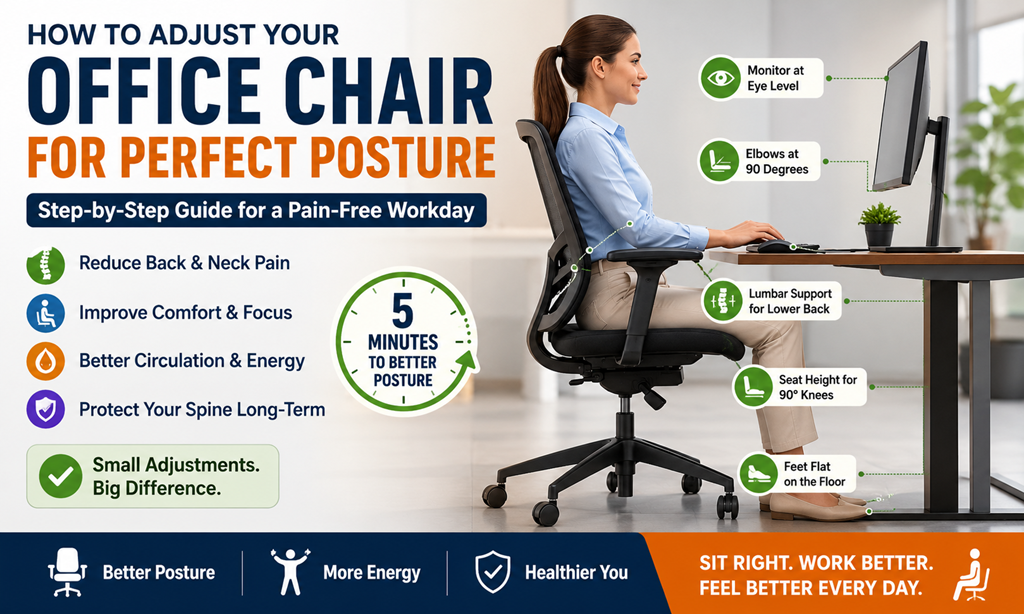
This is the most important adjustment you will make. Sit down and place both feet flat on the floor. Your knees should be at a 90-degree angle, neither higher than your hips nor lower. Your thighs should be parallel to the floor.
How to check:
- If your feet are dangling, the chair is too high; lower it
- If your knees are pointing upward, the chair is too low; raise it
- If you can slide two or three fingers under your thigh easily, you’re at the right height
Most office chairs have a pneumatic lever under the seat. Push it while sitting to lower the chair. Push it while standing slightly (reducing your weight) to raise it.
Step 2: Adjust the Seat Depth
Seat depth is how far you sit into the chair from the backrest to the edge of the seat.
The ideal position leaves two to three fingers of space between the back of your knees and the front edge of the seat. If the seat is too deep, it cuts into the back of your knees and restricts blood flow. If it’s too shallow, your thighs don’t get enough support.
Many chairs allow you to slide the seat pan forward or backward. If yours doesn’t, adjust how far back you sit.
The goal is to have your back touching the backrest while still having that small gap behind your knees.
Step 3: Set Up the Lumbar Support
Lumbar support is the curved part of the backrest that supports your lower back. This is where most people get it wrong: either the lumbar is too high, too low, or they’re not using it at all.
Your lower spine has a natural inward curve. Lumbar support is designed to maintain that curve. Without it, your lower back rounds outward, which puts enormous stress on your spinal discs.
How to position it correctly:
- Sit all the way back in your chair
- The lumbar support should press gently against the curve of your lower back, not your mid-back, not your tailbone
- It should feel supportive, not poking or pushing
Some chairs let you adjust the height of the lumbar pad. If yours does, move it until it sits right at the small of your back, roughly at the level of your belt.
Step 4: Adjust the Backrest Angle
Your backrest should be slightly reclined, not straight up at 90 degrees, and not leaning all the way back either. The sweet spot is between 100 and 110 degrees. This slightly reclined angle reduces pressure on your spinal discs and keeps your weight distributed more evenly.
Sitting bolt upright at 90 degrees actually puts more strain on your back than sitting at a slight recline. Many people don’t know this.
Use the backrest tension knob (usually under the seat or on the side) to find the right firmness. You want the backrest to feel supportive when you lean into it, not stiff like a wall, and not floppy like it’s falling away.
Step 5: Position the Armrests
Armrests reduce the strain on your shoulders and neck. But only when they’re set up correctly.
Correct armrest position:
- Your arms should rest comfortably with your elbows at roughly 90 degrees.
- Your shoulders should be relaxed, not lifted, not hunched.
- The armrests should be close enough to your body so your arms don’t reach outward.
If your armrests are too high, they push your shoulders up and cause tension. If they’re too low, you end up hunching forward to reach your keyboard.
Most armrests can be adjusted up and down. Some can also be moved inward, outward, or pivoted. Adjust them so your arms feel naturally rested, not lifted, not dropped.
One thing to avoid: Don’t lean your full body weight on armrests while typing. Use them to rest your arms during breaks, not as constant support while working.
Step 6: Align Your Monitor and Keyboard
Your chair adjustment is only half the story. Your desk setup matters just as much.
Monitor height: The top of your screen should be at eye level or very slightly below. If you’re constantly looking down or up, your neck will suffer regardless of how well your chair is adjusted.
Keyboard position: Your keyboard should sit at a height where your elbows are at 90 degrees, and your wrists are flat, not bent up or down. A slightly negative tilt (keyboard angled slightly away from you) is even better for long typing sessions.
Distance from screen: Sit at arm’s length from your monitor. If you’re leaning forward to see clearly, increase your font size; don’t move your chair closer.
Step 7: Check Your Sitting Habit
Even the best chair setup can’t help if you sit in bad positions. Here are the most common habits to break:
- Crossing your legs — throws your hips off balance and strains your lower back
- Leaning to one side — creates uneven spinal pressure over time
- Sitting on the edge of your seat without back support
- Slouching forward to reach your keyboard or screen
- Staying seated for too long — even in a perfect posture
Set a reminder to stand up and move for two to three minutes every hour. Walk to get water, stretch your back, roll your shoulders. Movement is your best long-term protection against posture-related problems.
Read Also:
- When Should You Replace Your Office Furniture
- 5 Best Ergonomic Mesh Office Chairs for Long Working Hours
- How Ergonomic Recliners Improve Long Sitting Comfort
Quick Posture Checklist
Use this every morning before you start work:
- Feet flat on the floor (or on a footrest)
- Knees at 90 degrees, hips level or slightly higher
- Two to three fingers of space behind your knees
- Lower back supported by lumbar pad
- Backrest reclined slightly at 100–110 degrees
- Elbows at 90 degrees, shoulders relaxed
- Monitor at eye level, one arm’s length away
- Wrists flat while typing
Final Thought
Perfect posture doesn’t require an expensive chair upgrade. It starts with understanding your current chair and using its adjustments the right way. Small changes to your seat height, lumbar support, and armrest position can make a dramatic difference to how you feel at the end of a workday.
That said, if your chair doesn’t offer the adjustments above no lumbar support, no height control, no armrests it might genuinely be holding your health back. In that case, it’s worth investing in an ergonomic office chair that supports your body properly.
At Aadinath Furniture, we offer a wide range of ergonomic office chairs from mesh chairs with full lumbar adjustment to premium leather executive chairs designed for long hours and real comfort.